Showing posts with label reading. Show all posts

ereaders and ebooks

I received an ereader for Christmas. I had been wanting one but couldn't justify buying one since I could read ebooks on my iPod Touch, so, though it isn't the one for which I had techno-lusted, I do have one and I do like using it. I have learned that many of the books for which I would have to pay from its online bookstore, true also for Amazon and I suspect Barnes and Noble, can be downloaded free from some other source. Of course, sometimes it's a matter of saving $0.89, but I DO enjoy getting things for FREE. Well, also, since I do read a lot, including copyright-free classics, the cost would add up over time. In case anyone is in the same boat, I thought I would share my findings.

 First, you need to know what format(s) your reader accepts and how to transfer to it ebooks that you download to your computer. You may find the same ebook in different formats on different sites, so don't give up easily.

I will mention later a few different sites, but sometimes simply doing a Google search will give you want you want. Let me give you an example. After searching unsuccessfully on a few ebook sites for Death Comes for the Archbishop by Willa Cather in epub format and free, I tried this search: "Death Comes for the Archbishop free epub." The result listed first was exactly what I wanted. I really would recommend this method. (You might use the same process to compare prices on newer books still under copyright, though you might have a more difficult time finding the book in a compatible format for your reader.)

There are many sites offering ebooks in different formats as free downloads. These sites are not created equal, as some offer mostly self-published writings, and others offer illegal copies of copyrighted books; I am not interested in these types, so there are no links to them here. I would definitely discourage you from stealing from authors by downloading pirated copies!

Three sites I have used in the past and found useful are:
Project Gutenberg
Feedbooks
Google eBookstore

If you are looking for copyrighted books, you may still be able to compare prices to find a better deal. You could use the same Google search process described above, but here are three digital bookstore sites you might check as well:
eBooks
Kobo
Google eBookstore


Read Users' Comments (0)

Google Search by Reading Level

I'm beginning to wonder if I couldn't do an entire year of Google tips! The ability to filter search results by reading level was apparently added in early December 2010.

Here are the description and directions from Google support:

Sometimes you may want to limit your search results to a specific reading level. For instance, a junior high school teacher looking for content for her students or a second-language learner might want web pages written at a basic reading level. A scientist searching for the latest findings from the experts may want to limit results to those at advanced reading levels. To limit your search results to a specific reading level, follow these steps:
1. On the search results page, click Advanced Search below the search box.
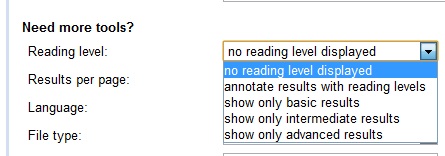
2. Next to "Reading level" within the "Need more tools" section, select your desired reading level (basic, intermediate, or advanced) or choose to show all results annotated with reading levels.
3. Click Advanced search at the bottom of the page.
4. At any time, you can click the X in the right corner of the blue bar beneath the search box to go back to seeing all results.
The image at right shows part of the results for a "solar eclipse" Google search with annotated results. Clicking on any of the three levels will limit the results displayed to those meeting the criteria for that level. You will notice, too, that the reading level is indicated for each entry.

A Google employee explains the method used to determine the reading level:
The feature is based primarily on statistical models we built with the help of teachers. We paid teachers to classify pages for different reading levels, and then took their classifications to build a statistical model. With this model, we can compare the words on any webpage with the words in the model to classify reading levels. We also use data from Google Scholar, since most of the articles in Scholar are advanced.
Understanding that the classification may not be totally accurate, it still might prove to be a useful start for finding appropriate results for the intended audience.

Read Users' Comments (0)

DailyLit


Have more opportunity at your computer than elsewhere to read? If you could get a "daily dose" of a book, just enough for one day at a time, would that make it easier for you to read a book? If so, DailyLit might be just right for you. A wide variety of authors and titles are available to choose from for FREE. Your selection will be delivered in installments via email on your choice of a daily, weekday, or Monday-Wednesday-Friday schedule. You can add books to a To Read list so that when you complete one book, the delivery of the next one will begin.

I have used this in the past, but two of the offerings mentioned in my most recent newsletter have drawn me back:
a 16-lesson Berlitz Spanish course, available through May 1
Murders in the Rue Morgue, in honor of Edgar Allan Poe's January birthday

I think I should be able to read these in Mobipocket Reader.

Read Users' Comments (0)

Mobipocket Reader

First, why elecronic books (eBooks)? This is just one more way to give people access to books. Many younger people are more used to looking at a computer screen, or certainly to an iPod or iPhone screen than at the pages of a book. While I happen to enjoy the feel of a book in my hand, reading from printed text, there are times when I find myself in a “waiting” situation without a book. I always, though, have my PDA, and I enjoy having a book waiting for me there. There are many reasons an individual might be interested in eBooks and eBook readers.

Amazon has its Kindle, and there are other devices available which I have not researched, but I am always interested in FREE options. Mobipocket Reader is a flexible FREE program available for the desktop and a number of mobile devices* which lets you “build, organize, read and annotate your entire eBook library” and  The reader is not a simple text reader, but can display graphics as well. Some books, such as Dorothy and the Wizard of Oz by L. Frank Baum I’m reading, include the illustrations from the original edition. Others, like Thornton W. Burgess’s Adventures of Reddy Fox are text only. In addition to eBooks, Mobipocket also can manage RSS feeds.

Downloading and installing the desktop version is all that is needed. The first time you connect your compatible mobile device, the application will be installed on it.

You can drag and drop .pdf, .txt, .rtf, html, and Microsoft Office files onto the desktop application to convert them.This gives the flexibility of choosing to read some lengthy documents, such as .pdf manuals, in a more comfortable environment or on a mobile device. The .pdf I opened in Mobipocket Reader was much easier to read than the original document, as the text was larger and it was broken into more manageable pages. If you desire, you can also create your own documents using the FREE Mobipocket Creator, inserting images and graphics along with text.

I love that when you select a word or larger piece of text, a menu box appears which will let you add a note, highlight it, copy it, modify it, or add a link to another location in the book. This makes it so easy to annotate and to create bookmarks for text you want to remember or come back to, as any of these actions creates a link at the right of the reading to its particular text. Here's what The Murders in the Rue Morgue looked like when I had finished the first half:


While you can purchase books, some sources make FREE eBooks available. These books, perhaps not so obviously, are those which are free from copyright restrictions. Simply download your selection, choosing to “open” rather than “save,” and the book will open in Mobipocket Reader ready to read, and the file will be saved in your My Documents eBook folder. Sources I’ve found and downloaded from include:
  • Diesel eBook Store (more than a million free eBooks sorted by category; also eBooks for purchase)
  • Project Gutenberg (over 30,000 free electronic books)
  • Manybooks (over 16,000 titles, sorted by title, genre, and author, wide variety of formats)
Wickpedia indicates that the text or personal additions cannot be printed or exported other than by copying and pasting into another application. ABC Palm Converter will convert some .prc files to Word, .txt, .rtf, or other formats. Annotations will not be included in the converted file, and the converter software will work only on REAdTEXt files; It will not convert files that have been converted to .prc files by Mobipocket using the drag and drop method.

This could be useful in classrooms and for students who have a mobile device other than an iPod/iPhone. It would also be useful for students who need larger text.

*”PalmOs, Windows Mobile, Symbian (Series 60, Series 80, 90, UIQ), Blackberry, iLiad (by iRex), Cybook, ... And if you have a Symbian smartphone, an iLiad, or a Cybook, there is a good chance that Mobipocket Reader is already preinstalled!” Source: Mobipocket (I note the list does not include the iPod)

Read Users' Comments (0)